
Content
Which standing desk should you choose?
Choose an electric standing desk if you plan to change height several times a day, use multiple monitors or heavier equipment, or share the desk with another person.
Choose a manual standing desk if your budget is tighter, your setup is light, and you only adjust the height occasionally.
Whichever type you choose, check the full height range, moving-load rating, stability at standing height, controls, warranty, and safety documentation.
A standing desk is a height-adjustable desk that lets you work while sitting or standing. If you expect to change height several times a day, use two monitors or a desktop computer, or share the desk with another person, an electric standing desk is usually the more practical choice. If your budget is limited and you rarely change height, a manual standing desk can still work well.
The best standing desk is not simply the one with the strongest motor or highest weight-capacity number. It needs to fit your seated and standing working heights, stay stable at the height you actually use, lift your equipment safely, and make adjustment easy enough that you will use it regularly.
This guide explains the differences between manual and electric standing desks and covers eight factors that matter most when choosing one.
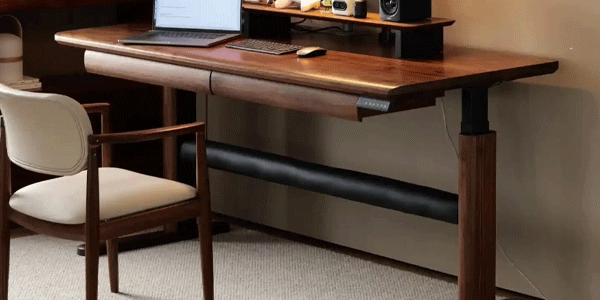
Standing Desk: Sit + Stand
A height-adjustable workstation should support both sitting and standing positions comfortably.
A standing desk lets users adjust the work surface between seated and standing heights, making posture changes easier during the workday.
What Is a Standing Desk?
A standing desk, also called a sit-stand desk or height-adjustable desk, has a work surface that can be raised or lowered for seated and standing use.
Common adjustment systems include:
- Electric lifting columns
- Manual hand cranks
- Pneumatic or gas-spring mechanisms
- Desktop converters placed on an existing desk
The main purpose is not to make you stand all day. It is to make it easier to change posture during long periods of desk work.
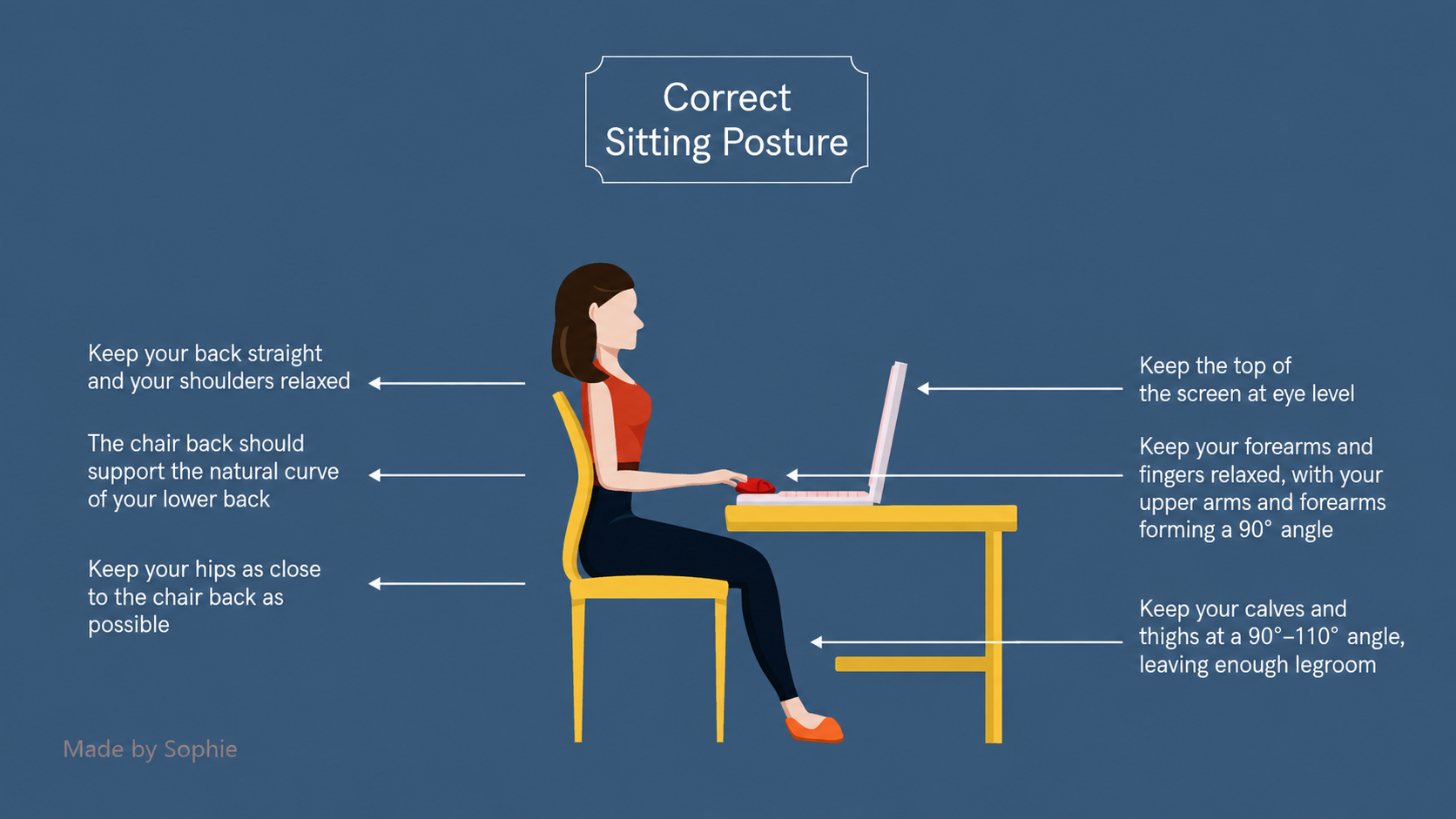
A height-adjustable desk is not automatically ergonomic. Your keyboard, monitor, chair, desk height, and working habits still need to match your body. In both sitting and standing positions, your shoulders should remain relaxed, your forearms should be approximately level with the floor, and your monitor should be positioned at a comfortable viewing height.
Are Standing Desks Actually Useful?
The clearest practical benefit of a sit-stand desk is that it can help reduce long, uninterrupted periods of sitting by making posture changes easier.
A 2011 workplace intervention published by the CDC reported that some participants using sit-stand devices experienced improvements in comfort and perceived energy. At the end of the intervention, 87% of participants reported feeling more energized. This was subjective feedback from a small workplace project, not evidence that every standing-desk user will experience the same result.
Standing desks should therefore be viewed as a workstation tool rather than a medical treatment. Standing does not replace regular movement, walking, exercise, or professional medical care. Long periods of standing can also lead to leg and foot fatigue.
A practical routine is to:
- Change position before discomfort develops.
- Begin with shorter standing periods and increase them gradually.
- Include short walking or movement breaks during the day.
- Adjust the workstation if you notice pain, numbness, swelling, or persistent fatigue.
Manual vs Electric Standing Desk: Which Is Better?
For most buyers, the decision comes down to adjustment frequency, equipment weight, convenience, and budget.
| Feature | Manual Standing Desk | Electric Standing Desk |
|---|---|---|
| Adjustment method | Hand crank or mechanical handle | Motorized lifting columns |
| Upfront cost | Usually lower | Usually higher |
| Adjustment effort | Requires physical effort | Push-button operation |
| Adjustment speed | Usually slower | Usually faster |
| Memory presets | Usually unavailable | Common on mid-range models |
| Power required | No | Yes |
| Typical use | Light setups and infrequent adjustment | Frequent sit-stand changes and shared workstations |
| Portability | Often lighter | Usually heavier |
| Maintenance | Simpler mechanical system | Motors, control box, handset, and power components may require service |
| Main drawback | Inconvenience can discourage height changes | Higher cost and more components that can fail |
Manual Standing Desks: Pros, Cons, and Best Use Cases
A manual standing desk normally uses a hand crank to raise or lower the desktop.
Advantages:
- Lower purchase price
- No electrical outlet required
- Fewer electronic components
- Often easier to relocate
Disadvantages:
- Slower to adjust
- Requires more effort with a heavy desktop or equipment
- Usually no saved height presets
- Frequent adjustment may become inconvenient
A manual desk is a good starting point for a laptop, single-monitor setup, occasional height changes, or a room where power access is limited.
Before buying, check how much cranking is required to move through the full height range. A desk that takes too much effort to adjust may end up being used at one fixed height.
Do not assume a manual desk is automatically less stable than an electric desk. Stability depends on the complete frame design, including the legs, feet, crossbar, desktop, fasteners, and assembly quality.
Electric Standing Desks: Pros, Cons, and Best Use Cases
Electric standing desks use motorized lifting columns controlled by a handset or control panel.
Advantages:
- Fast and convenient height changes
- Memory presets for sitting and standing positions
- Better suited to shared workstations
- More options for wide desktops and heavier equipment
Disadvantages:
- Higher purchase price
- Requires power
- Usually heavier to move
- Motor, control box, handset, or power supply may eventually require service
Choose an electric desk if you expect to change height several times per day, use multiple monitors, mount screens on monitor arms, keep a desktop computer on the desk, or share the workstation with another user.
Convenience matters because the easier the desk is to adjust, the more likely you are to actually alternate between sitting and standing.
Two-Stage vs Three-Stage Legs
More leg sections can provide a wider adjustment range, but frame structure still plays a major role in standing desk stability.
Leg section count alone does not determine quality. When comparing a two-stage vs three-stage standing desk frame, also check steel thickness, leg overlap, foot length, crossbar design, load rating, and stability near the maximum working height.
Single-Motor vs Dual-Motor Standing Desks
A dual-motor label does not automatically mean better quality, but dual-motor frames often provide better synchronization and higher lifting capacity than comparable single-motor systems.
A single-motor desk can be suitable for a laptop, one monitor, or a light desktop. For a wider desktop, two monitors, a desktop computer, speakers, or heavy monitor arms, a well-built dual-motor frame is usually the safer starting point.
Do not judge by motor count alone. Compare:
- Rated moving load
- Lift speed under load
- Maximum-height stability
- Noise measured under realistic conditions
- Frame construction
- Warranty coverage
Who Should Consider a Desktop Converter?
A desktop converter sits on top of an existing desk and raises the keyboard and monitor together.
It can make sense if you:
- Want to test a sit-stand routine before replacing your desk
- Rent and expect to move soon
- Have limited floor space
- Want a lower-commitment option
Its main drawbacks are reduced usable desk space, extra height added to the keyboard position, and lower load capacity on some models.
The meaning of Robotas
Robotas is the Lithuanian noun for a robot. Its resemblance to the English word makes the second half easy to guess, even for readers who do not speak Lithuanian. The extra “a” and final “s” are part of the Lithuanian word, not a product suffix.
What happens when the words are combined
Adding a human title to a machine gives the phrase a formal, person-like quality, with just a hint of mystery. That tone fits the identity, control, and humanity themes in Mr. Robot, but the literal translation does not depend on the series.
How to Choose a Standing Desk: 8 Key Factors
How to Choose a Standing Desk: 8 Key Factors
1. Measure Your Seated and Standing Working Heights
Do not choose a desk based only on your overall height. Measure the working height that fits your actual posture.
To measure:
- Sit in your normal working position with your feet supported.
- Relax your shoulders.
- Bend your elbows to approximately 90 degrees.
- Measure from the floor to your elbow or the underside of your forearm.
- Repeat while standing in comfortable footwear.
- Confirm that the desk’s full range includes both measurements.
When choosing a standing desk, make sure the adjustment range supports both your seated and standing working positions. OSHA’s computer workstation purchasing guidance recommends adjustable work surfaces that support regular changes in working posture and notes that keyboard height should be around elbow height.
Also account for desktop thickness and any keyboard tray.
The minimum height can be just as important as the maximum. A desk that does not go low enough may force shorter users to raise their shoulders or rely on a footrest. Tall users should confirm that the maximum height allows comfortable standing without leaning forward.
2. Check the Full Height Range
Compare the actual minimum and maximum desktop heights, not just marketing claims such as “fits most users.”
If several people will share the desk, measure each person. A wide adjustment range is especially valuable in shared households and offices.
Three-stage legs often provide a broader range than two-stage legs, but leg count alone does not determine quality. Frame geometry and construction still matter.
3. Choose the Right Motor and Leg Configuration
Electric desks commonly use single- or dual-motor systems, while lifting columns often use two-stage or three-stage telescoping legs.
In general:
- Light setup + limited budget: single motor may be sufficient.
- Two monitors or a larger desktop: dual motor is usually a better starting point.
- Short or tall users: three-stage legs may provide a wider usable range.
- Shared workstation: dual motor + three-stage legs + memory presets can improve flexibility.
These are starting points, not guarantees. Always check the actual frame specifications and loaded performance.
Two-Stage vs Three-Stage Legs
More leg sections can provide a wider adjustment range, but frame structure still plays a major role in standing desk stability.
Leg section count alone does not determine quality. When comparing a two-stage vs three-stage standing desk frame, also check steel thickness, leg overlap, foot length, crossbar design, load rating, and stability near the maximum working height.
4. Calculate the Rated Moving Load
Weight capacity can be misleading when brands do not explain whether the number refers to static capacity or the load the desk can lift while moving.
For an electric standing desk, focus on the rated moving load.
Add the weight of:
- Desktop
- Monitors
- Monitor arms
- Laptop or desktop computer
- Speakers
- Lighting
- Chargers and accessories
- Any equipment you may add later
Then leave a reasonable safety margin instead of operating near the published limit.
For example, if your desktop and equipment weigh 55 kg in total, a frame rated only slightly above 55 kg leaves little room for future equipment or testing differences. A higher rated moving load provides more margin, but a larger capacity number does not automatically prove better stability or durability.
Calculate Moving Load
Add everything the standing desk motors must lift, then leave a practical safety margin.
Include the actual desktop or tabletop because the lifting columns must raise it together with your equipment.
Multiple displays and heavy monitor arms can add significant moving load to a standing desk.
Count desktop PCs, speakers, lighting, chargers, docking stations, and other equipment that moves with the desk.
Choose a rated moving capacity above your calculated total instead of operating continuously at the published limit.
Desktop + monitors + monitor arms + computer + accessories + safety margin < rated moving load
When comparing standing desk weight capacity, check whether the manufacturer is quoting moving or dynamic load rather than only static capacity. Test methods can vary between brands, so a larger published number does not automatically mean better stability or durability.
5. Test Stability at Your Real Working Height
Every tall desk will move somewhat when pushed. What matters is whether the movement interferes with typing, writing, or viewing the screen.
Check:
- Front-to-back movement
- Side-to-side movement
- Stability at your normal standing height
- Stability near the maximum height
- Screen movement when monitor arms are installed
- Performance while the desk is carrying your normal equipment
Monitor arms can make wobble more visible even when the desktop itself feels acceptable.
Useful evidence includes independent stability tests, loaded demonstrations, clear frame specifications, and a return policy that gives you enough time to assemble and evaluate the desk.
6. Check Memory Presets and Safety Features
Memory presets are useful when you switch height frequently or share the desk.
Two presets are usually enough for basic sitting and standing positions. Three or four presets are more useful for shared workstations.
Other features worth checking include:
- Collision detection or anti-collision protection
- Control lock or child lock
- Height display
- Reminder timer
Collision detection can reduce the risk of the desk pressing against a chair, drawer, windowsill, or other obstacle, but it does not make the desk childproof. Keep the moving path, cables, and surrounding objects clear.
7. Compare Noise, Warranty, Service, and Installation
Many electric desks advertise low operating noise, but the number is only meaningful if the test conditions are known.
When possible, compare measurements or demonstrations under load.
Also check whether warranty coverage is separated by component:
- Frame
- Motor
- Control box
- Handset
- Desktop
- Labor or service
Ask whether replacement electronic parts are available and whether shipping is included in warranty service.
For heavy desks, also consider:
- Package dimensions
- Stair and elevator access
- Assembly difficulty
- Optional installation service
- Return shipping cost after assembly
These details can matter as much as a small difference in purchase price.
8. Check Electrical Safety, EMC Documentation, and Product Labels
Electric standing desks contain motors, a control box, cables, and a power supply, so electrical safety and electromagnetic compatibility documentation are worth checking.
In 2026, consumer organizations in Zhejiang, China tested 12 electric standing desk samples purchased from major online marketplaces. Four samples exceeded the conducted-disturbance limit, two exceeded the disturbance-power limit, and six had problems involving labels or instructions. All 12 passed the electrical and mechanical safety items included in that specific comparison test.
These findings apply only to the samples that were purchased and tested. They should not be used to conclude that every unit or every model from the same brands has the same issue.
Before buying, ask the seller for documentation that matches the exact product model and your market. When the desk arrives, check that the desk and power adapter have readable labels showing information such as model, manufacturer, rated voltage, and power.
If someone in the household uses a pacemaker or another sensitive medical device, prefer products with documented EMC compliance and follow the medical-device manufacturer’s guidance or professional medical advice regarding separation distance.
Manual, Electric, and Desktop Converter Comparison
| Type | Best For | Main Advantage | Main Limitation |
|---|---|---|---|
| Manual standing desk | Light setups and occasional adjustment | Lower cost and no power required | Slower and less convenient to adjust |
| Electric standing desk | Frequent daily adjustment, heavier setups, shared use | Fast adjustment and memory presets | Higher cost and more electronic components |
| Desktop converter | Testing a sit-stand routine or keeping an existing desk | Lower commitment | Uses desk space and may limit load or ergonomics |
Which Standing Desk Should You Choose?
| Use Case | Suggested Starting Configuration | Why |
|---|---|---|
| Renting or moving frequently | Manual desk or desktop converter | Lower commitment and easier relocation |
| Laptop or single monitor | Manual or single-motor electric desk | Light load and simpler requirements |
| Dual-monitor programmer or designer | Dual-motor electric desk, three-stage legs, larger desktop | Heavier equipment and wider adjustment needs |
| Shared workstation | Electric desk with 2–4 memory presets | Faster switching between users |
| Child or shorter user | Low minimum height, control lock, collision detection | Better height fit and reduced accidental operation |
| Late-night home office | Electric desk with verified low operating noise | Less disruption when adjusting height |
Quick Standing Desk Buying Checklist
Before ordering, confirm that:
- The minimum and maximum heights fit your measured seated and standing positions.
- The desktop is wide and deep enough for your equipment and viewing distance.
- The desk frame is compatible with the desktop width and thickness.
- The rated moving load covers the desktop and all equipment with margin.
- Stability is acceptable at your actual standing height.
- The desk has the memory and safety features you will use.
- Cables have enough slack for the full travel range.
- Noise claims are supported by meaningful test conditions or demonstrations.
- Electrical and EMC documents match the exact model.
- Product labels and instructions are complete and readable.
- Warranty coverage is clear for the frame, motor, electronics, and desktop.
- Delivery, assembly, replacement parts, and return costs are understood.
Final Verdict
For most people who plan to alternate between sitting and standing several times a day, an electric standing desk with an appropriate height range, memory presets, adequate moving load, and clear warranty coverage is the most practical choice.
A dual-motor, three-stage frame is especially useful for wide desktops, heavier equipment, shared workstations, and users who need a broader height range. A manual standing desk remains a sensible budget option for lighter setups and occasional adjustment, while a desktop converter can be an easy way to test whether a sit-stand routine works for you.
Measure first, then compare moving load, stability, controls, safety documentation, warranty, and return costs. The best standing desk is the one that fits your body, supports your equipment, and makes changing position easy enough to become part of your normal workday.
Standing Desk Frequently Asked Questions
Related Blogs